Losing important files from a USB drive can be stressful, especially when those files contain personal documents, work projects, photos, videos, or other valuable information. Accidental deletion, formatting, file corruption, malware, and unexpected device errors can all make data appear to be permanently lost. Fortunately, deleted files are not always gone immediately. With the right approach, it may be possible to recover deleted files from a USB drive without causing further damage to the stored data.
Understanding how USB data recovery works can help you choose the safest recovery method. The most important rule is to stop using the USB drive as soon as you realize files are missing. New data written to the device may overwrite the space previously occupied by deleted files, reducing the chances of successful recovery.
What Happens When Files Are Deleted from a USB Drive?
When you delete a file from a USB drive, the operating system generally removes the reference that tells the computer where the file is stored. The actual data may remain on the storage device until new information replaces it.
This means deletion and permanent destruction are not always the same thing. If the deleted file has not been overwritten, specialized recovery software may be able to locate the remaining data and reconstruct the file.
However, recovery becomes more difficult when the USB drive is used extensively after deletion. Copying new documents, downloading files, or even moving existing data can potentially overwrite the space containing the deleted information.
Stop Using the USB Drive Immediately
The first step when attempting to recover deleted files from a USB drive is to minimize further activity on the device. Do not save new files, install applications onto the USB drive, or repeatedly attempt different operations that could alter its contents.
Safely disconnect the USB drive if you are not actively performing recovery. If the drive contains particularly important or irreplaceable information, consider creating a sector-by-sector image before attempting complicated recovery procedures. Working from an image can reduce the risk of modifying the original storage device.
The less you interact with the affected USB drive, the better the opportunity for recovering intact information.
Check Whether the Files Are Actually Deleted
Before using recovery software, make sure the files are genuinely missing. Sometimes files appear to have disappeared because of hidden attributes, an incorrect folder location, file-system errors, or a temporary connection problem.
Reconnect the USB drive to a reliable computer and check its folders carefully. You can also enable hidden files through your operating system’s file-management settings. If the USB drive is recognized but certain files are missing, the problem may be limited to deleted or corrupted directory information.
If the drive is not recognized at all, repeatedly reconnecting it may not solve the problem. Physical damage or serious file-system problems may require a different recovery strategy.
Use Reliable Data Recovery Software
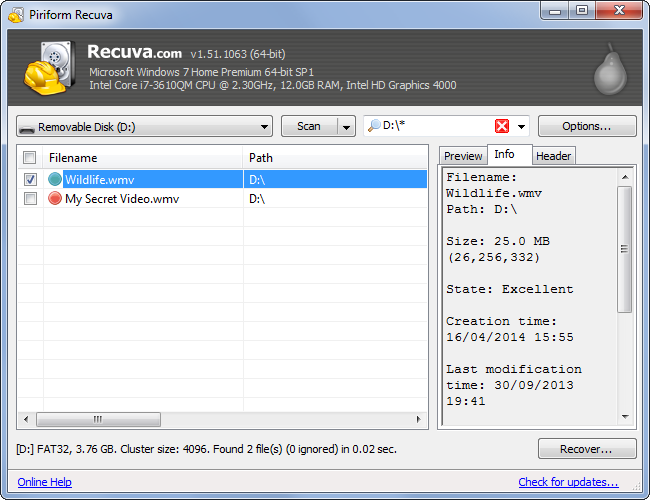
When conventional methods do not locate your files, data recovery software can scan the USB drive for recoverable information. Professional recovery applications generally search the storage device for file records, recognizable file structures, and other information that can help reconstruct deleted data.
Choose software that supports your USB drive’s file system and the types of files you need to recover. Common file systems include FAT32, exFAT, and NTFS, depending on how the USB drive was formatted and what operating system was used.
Install the recovery software on your computer’s internal drive rather than the affected USB device. This prevents the recovery application itself from overwriting potentially recoverable information.
Scan the USB Drive Carefully
A recovery program may offer different scanning options. A quick scan can be useful when recently deleted files still have intact file-system records. A deeper scan may take considerably longer but can search the storage device more thoroughly when directory information is damaged or unavailable.
Start with the least invasive appropriate scan. If the desired files cannot be found, a deeper scan may provide additional results.
During scanning, avoid interrupting the process unnecessarily. Large USB drives can take considerable time to examine, particularly when the storage contains many files or has file-system problems.
Preview Files Before Recovery
A useful recovery application should allow you to preview supported files before restoring them. Previewing can help determine whether a file is intact and whether the recovery software has identified the correct data.
Pay attention to file names, sizes, dates, and folder structures when those details are available. If original names are missing, recovery software may assign generic names based on the file type or location.
Recovering a file successfully does not necessarily mean every part of it will be usable. Files that were partially overwritten may open with missing content or display corruption.
Save Recovered Files to Another Location
One of the most important rules when you recover deleted files from a USB drive is to save the recovered files somewhere other than the original USB drive.
For example, you can restore recovered documents to your computer’s internal storage or another reliable external storage device. Saving recovered files back to the same USB drive could overwrite other deleted information that you are still trying to recover.
If you need to restore many files, make sure the destination has enough available storage before starting the recovery process.
What If the USB Drive Was Formatted?
Formatting does not always mean that all data has immediately disappeared. Depending on the type of formatting performed, the file system used, and whether new information has been written afterward, recovery may still be possible.
However, the chances of successful recovery can vary significantly. Avoid formatting the drive again while attempting to retrieve your information.
If the files are extremely important, consider creating a complete image of the USB drive and performing recovery operations on that image. This approach preserves the original device as much as possible.
Dealing With a Damaged USB Drive
Software-based recovery is most appropriate when the USB drive is physically functioning and can be detected by the computer. A USB device that disconnects repeatedly, becomes unusually hot, produces abnormal behavior, or is not detected consistently may have hardware-related problems.
In such cases, continuing to scan the drive can potentially make the situation worse. Professional data recovery specialists may be better equipped to diagnose hardware failures and use specialized techniques to retrieve information.
Avoid opening a USB flash drive yourself unless you have the appropriate technical expertise and equipment.
How to Improve Future Data Protection
Successful recovery is useful, but preventing data loss is even better. Important USB files should not exist in only one location. Keep backup copies of critical documents, photographs, projects, and other valuable information.
A simple backup strategy can include your computer, an external backup device, and a trusted cloud storage service. Safely eject USB devices when possible, keep them away from extreme temperatures and moisture, and avoid using unreliable storage devices for critical information.
Regularly checking backup copies can also help ensure that your files can actually be restored when needed.
Final Thoughts
The ability to recover deleted files from a USB drive depends on several factors, including how the files were deleted, whether new data has overwritten them, the condition of the storage device, and the file system involved. Acting quickly and minimizing further use of the USB drive can improve the chances of successful recovery.
Start by checking whether the files are hidden or misplaced, then consider reliable recovery software if they are genuinely deleted. Use appropriate scanning methods, preview recoverable files whenever possible, and always save restored information to a different storage location.
For severely damaged or highly valuable data, professional recovery assistance may be the safest option. Most importantly, establish a dependable backup routine so that accidental deletion or USB failure does not put important information at risk again.