Gaming accessories have become increasingly popular among players who want to customize their controller experience. One device that has attracted significant attention is Cronus Zen, a controller adapter that supports customization, remapping, and scripting features across compatible games and platforms. For players searching for the best cronus zen scripts, understanding what scripts do and how to evaluate them is important before choosing any particular setup.
A good script should be reliable, easy to configure, compatible with the intended game and controller, and appropriate for fair gameplay. Rather than focusing only on claims of improved performance, players should consider stability, customization options, compatibility, and whether a particular script follows the rules of the game or platform.
What Are Cronus Zen Scripts?
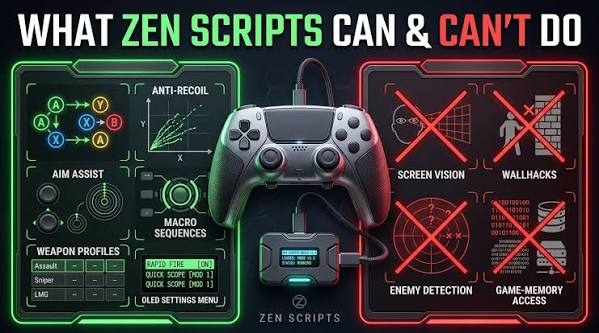
Cronus Zen scripts are small programs or configurations designed to modify how a compatible controller responds to inputs. Depending on their purpose, scripts can automate certain controller functions, create custom button mappings, or provide additional customization options.
The Cronus Zen ecosystem supports different types of configurations, and users may find scripts designed for specific games, controllers, or gameplay preferences. Because games frequently receive updates, compatibility can change over time.
For that reason, the best script is not necessarily the most popular one. A useful script should match the player’s equipment and intended purpose while remaining stable during normal gameplay.
Features to Look for in the Best Cronus Zen Scripts
When comparing different scripts, several factors can help determine whether a configuration is worthwhile.
Compatibility
Compatibility should be the first consideration. A script designed for one game or controller setup may not work correctly with another. Players should check the supported game, console, controller model, and software or firmware requirements before installing anything.
Easy Configuration
A complicated script can make the setup process frustrating. The best Cronus Zen scripts generally provide clear configuration options and understandable instructions. Being able to adjust settings without changing complicated code can make customization much easier.
Stability
A script that causes unexpected inputs, connection problems, or inconsistent controller behavior is unlikely to provide a good experience. Stability is particularly important for players who use customized controller settings regularly.
Customization
Customization is one of the main reasons players explore controller scripts. Useful configurations may allow users to personalize button assignments, sensitivity-related settings, or other controller functions.
A good customization system gives players control without making the setup unnecessarily complicated.
Popular Categories of Cronus Zen Scripts
There are different categories of scripts available within the broader Cronus Zen community.
Controller Customization Scripts
These scripts focus primarily on changing button layouts and controller behavior. They can be useful for players who prefer a different control scheme or want to make certain commands easier to access.
Accessibility-Oriented Configurations
Some controller configurations can help players customize controls according to their individual needs. Remapping buttons and simplifying frequently used commands can make games more comfortable and accessible.
Training and Practice Configurations
Some users are interested in scripts that support practice or training environments. These configurations can be useful when experimenting with controller settings in appropriate offline or permitted environments.
Game-Specific Configurations
Game-specific scripts are designed around particular titles. Because every game has different mechanics and updates, these configurations should be checked carefully for current compatibility.
Why Compatibility Matters
One of the biggest mistakes users can make is assuming that every Cronus Zen script works universally. Games, consoles, controllers, and firmware versions can differ considerably.
A configuration that worked several months ago may behave differently after a game or firmware update. Before using a script, users should verify that it supports their current setup.
It is also useful to keep notes about controller settings. If a new configuration causes problems, having the original settings available makes it easier to return to a familiar setup.
Safety and Responsible Use
Controller customization should always be approached responsibly. Some scripts may provide automation or input modifications that are prohibited in competitive multiplayer environments. Using such configurations can potentially violate the rules of a game, tournament, or online service.
Players should therefore check the relevant game’s rules before using scripts online. Competitive environments may have specific policies concerning controller adapters, macros, automation, and modified inputs.
For casual or offline use, customization can be a useful way to experiment with controller layouts and accessibility settings. In competitive settings, however, players should prioritize fair play and follow the applicable rules.
How to Choose the Right Script
Choosing the right configuration becomes easier when players define their goal first.
If the main objective is controller remapping, a simple customization configuration may be sufficient. If accessibility is the priority, users should look for flexible button-mapping options. If the configuration is intended for a specific game, compatibility should receive particular attention.
Players should also avoid choosing a script simply because it is described as the “best” online. Reviews, update history, compatibility information, and clear documentation are more useful indicators.
Keep Your Setup Updated
Gaming hardware and software change frequently. Developers release game patches, console manufacturers update systems, and controller firmware can change compatibility.
For this reason, players should regularly check whether their Cronus Zen setup is still supported. Keeping firmware and officially supported software components updated can reduce compatibility problems.
At the same time, users should avoid downloading unknown files from suspicious sources. Untrusted scripts or software may create unnecessary security and reliability risks.
Testing a Configuration
Before relying on a new controller configuration, test it in an appropriate environment. Check whether every button responds correctly and whether the controller behaves as expected.
Testing also helps identify conflicts between different settings. If several configurations are active simultaneously, troubleshooting can become more difficult.
A simple approach is to change one setting at a time and test the result. This makes it easier to identify which configuration is responsible for a particular behavior.
Common Mistakes to Avoid
One common mistake is installing a script without checking compatibility. Another is using outdated configurations after a major game update.
Players should also avoid copying settings without understanding what they change. A configuration that works well for one person may feel completely different to another player because controller preferences vary.
Finally, users should not assume that a more complicated script automatically provides a better experience. In many cases, a simple and stable configuration is more useful than a highly complicated one.
Final Thoughts
Finding the best Cronus Zen scripts depends on the player’s controller, game, platform, preferences, and intended use. Compatibility, stability, customization, documentation, and responsible use are more important than popularity alone.
Players should research a configuration before installing it, test it carefully, and check the rules of any game or competitive environment where it will be used. For many users, the ideal setup is one that provides comfortable controller customization without unnecessary complexity.
Ultimately, a good controller configuration should improve the overall gaming experience while respecting the rules and other players. By focusing on reliable customization and responsible use, players can make more informed decisions when exploring Cronus Zen configurations.